Section 3 Weather Input
3.1 Loading Data
To add weather data to our SWAT project, we will use svatools (Svajunas, Rets, and Strauch 2023)
update 2024: svatools has been migrated to SWATprepR
3.1.2 Load in the file(s) and load svatools template
First we load in the template and fill it in with our values and rename it to “cs10_weather_data.xlsx”. This is not done within R. No detailed documentation exists on the source of this data (yet).
There has been some discussion in issue #48
#temp_path <- system.file("extdata", "weather_data.xlsx", package = "svatools")
# /// fill out this template and save "cs10_weather_data.xlsx" ///
We are using the following projection for this project:
Now we can load it in with Svatools.
met_lst <- svatools::load_template(template_path = "model_data/input/met/cs10_weather_data.xlsx", epgs_code)## [1] "Loading data from template."
## [1] "Reading station ID1 data."
## [1] "Loading of data is finished."3.1.3 Proof the station
Checking the location of the station:
basin_path <- "model_data/input/shape/cs10_basin.shp"
basin <- st_transform(st_read(basin_path), epgs_code) %>%
  mutate(NAME = "Basin")
## Reading layer `cs10_basin' from data source
## `C:\Users\mosh\Documents\GIT\swat-cs10\model_data\input\shape\cs10_basin.shp'
## using driver `ESRI Shapefile'
## Simple feature collection with 1 feature and 1 field
## Geometry type: POLYGON
## Dimension: XY
## Bounding box: xmin: 603439.4 ymin: 6607792 xmax: 610984.4 ymax: 6622017
## Projected CRS: ETRS89 / UTM zone 32N3.2 Weather Generator
We only have one weather station, which means only one weather generator.
wgn <- prepare_wgn(met_lst,
                   TMP_MAX = met_lst$data$ID1$TMP_MAX,
                   TMP_MIN = met_lst$data$ID1$TMP_MIN,
                   PCP = met_lst$data$ID1$PCP,
                   RELHUM = met_lst$data$ID1$RELHUM,
                   WNDSPD = met_lst$data$ID1$WNDSPD,
                   MAXHHR = met_lst$data$ID1$MAXHHR,
                   SLR = met_lst$data$ID1$SLR)
## [1] "Coordinate system checked and transformed to EPSG:4326."
## [1] "Working on station ID1:WS_AAS"3.4 Atmospheric Deposition
Instructions and documentation can be found here
Getting the data:
basin_path <- "model_data/input/shape/cs10_basin.shp"
df <-
  get_atmo_dep(
    basin_path,
    start_year = 2010,
    end_year = 2020,
    t_ext = "year"
  )

readr::write_csv(df, file = "model_data/input/met/atmodep.csv")
A plot of the results:
df <- readr::read_csv("model_data/input/met/atmodep.csv", show_col_types = F)
ggplot(pivot_longer(df, !DATE, names_to = "par", values_to = "values"), aes(x = DATE, y = values))+
  geom_line()+
  facet_wrap(~par, scales = "free_y")+
  theme_bw()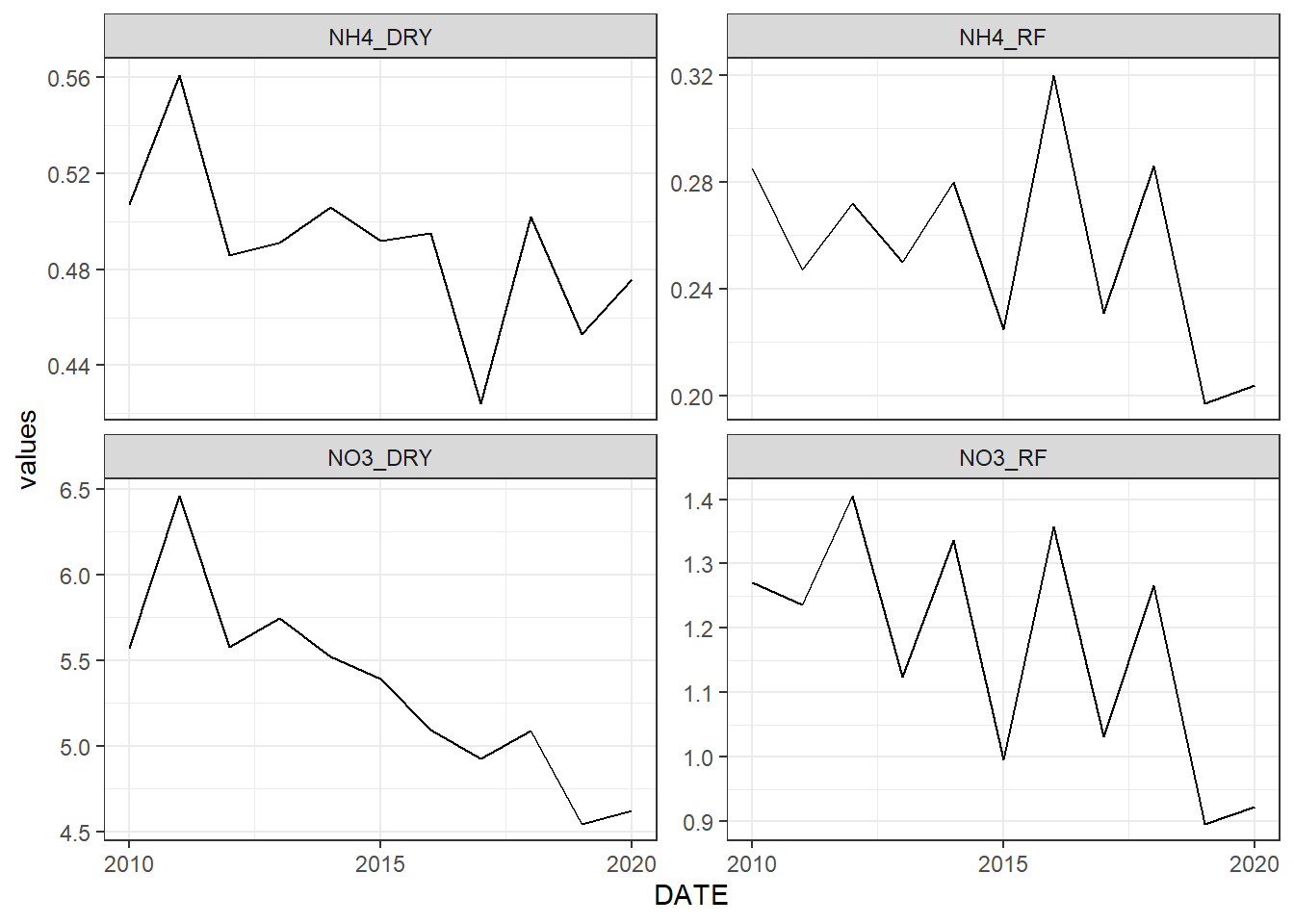
Figure 3.1: Atmospheric Deposition data grabbed by svatools
Adding the data to the SQLITE
Big thank you to Svajunas for his svatools package, making our lives much easier!
3.5 Re-analysis Weather
Note: we switched to this dataset in early 2024 as our model performed much better with this dataset. Detailed documentation of this performance increase might someday be added here.
As of March, 2024, our SWAT+ setup uses virtual weather stations derived from a spatially exhaustive dataset of weather data from MetNo’s (met.no) Reanalysis3 project. To do this, our in-house package miljotools was used. You can read more about how this process works, and more about the dataset here
#remotes::install_github(repo = "moritzshore/miljotools", ref = remotes::github_release())
require(miljotools)
## Loading required package: miljotoolsThe data was sourced and stored in a separate repository:
https://gitlab.nibio.no/moritzshore/metnoreanalysis3-downloads
Therefore the code shown here will only be for documentation purposes and will not actually effect the current project setup.
dir.create("model_data/temp", showWarnings = F)
file.copy(from = list.files("model_data/cs10_setup/swat_input/", full.names = T), to = "model_data/temp", overwrite = T)
## [1] TRUE TRUE TRUE TRUE TRUE TRUE TRUE TRUE TRUE TRUE TRUE TRUE TRUE TRUE TRUE
## [16] TRUE TRUE TRUE TRUE TRUE TRUE TRUE TRUE TRUE TRUE TRUE TRUE TRUE TRUE TRUE
## [31] TRUE TRUE TRUE TRUE TRUE TRUE TRUE TRUE TRUE TRUE TRUE TRUE TRUE TRUE TRUE
## [46] TRUE TRUE TRUE TRUE TRUE TRUE TRUE TRUE TRUE TRUE TRUE TRUE TRUE TRUE TRUE
## [61] TRUE TRUE TRUE TRUE TRUE TRUE TRUE TRUE TRUE TRUEThe following function gets the (hourly) data. For demonstration purposes, only 3 days worth.
download_folder <- get_metno_reanalysis3(
area = "model_data/input/shape/cs10_basin.shp",
directory = "model_data/temp",
fromdate = "2015-01-01 00:00:00",
todate = "2015-01-03 00:00:00",
area_buffer = 1500,
preview = T
)
Our SWAT+ setup runs on a daily timestep, so we need daily data:
daily_data_path <-
  reanalysis3_daily(path = download_folder,
                    outpath = "model_data/temp/",
                    precision = 2)
Now with the help of SWATprepR we can add this data to our SWAT+ setup. (excuse the long output)
These three functions can be consolidated into one workflow with the following function:
swat_weather_input_chain(
  area = "model_data/input/shape/cs10_basin.shp",
  swat_setup = "model_data/temp/",
  directory = "model_data/temp/",
  from = "2013-01-01 00:00:00",
  to = "2022-12-31 00:00:00"
)
Note: as of right now we have unit conversion problems with solar radiation, so we are using our old weather station for SLR.
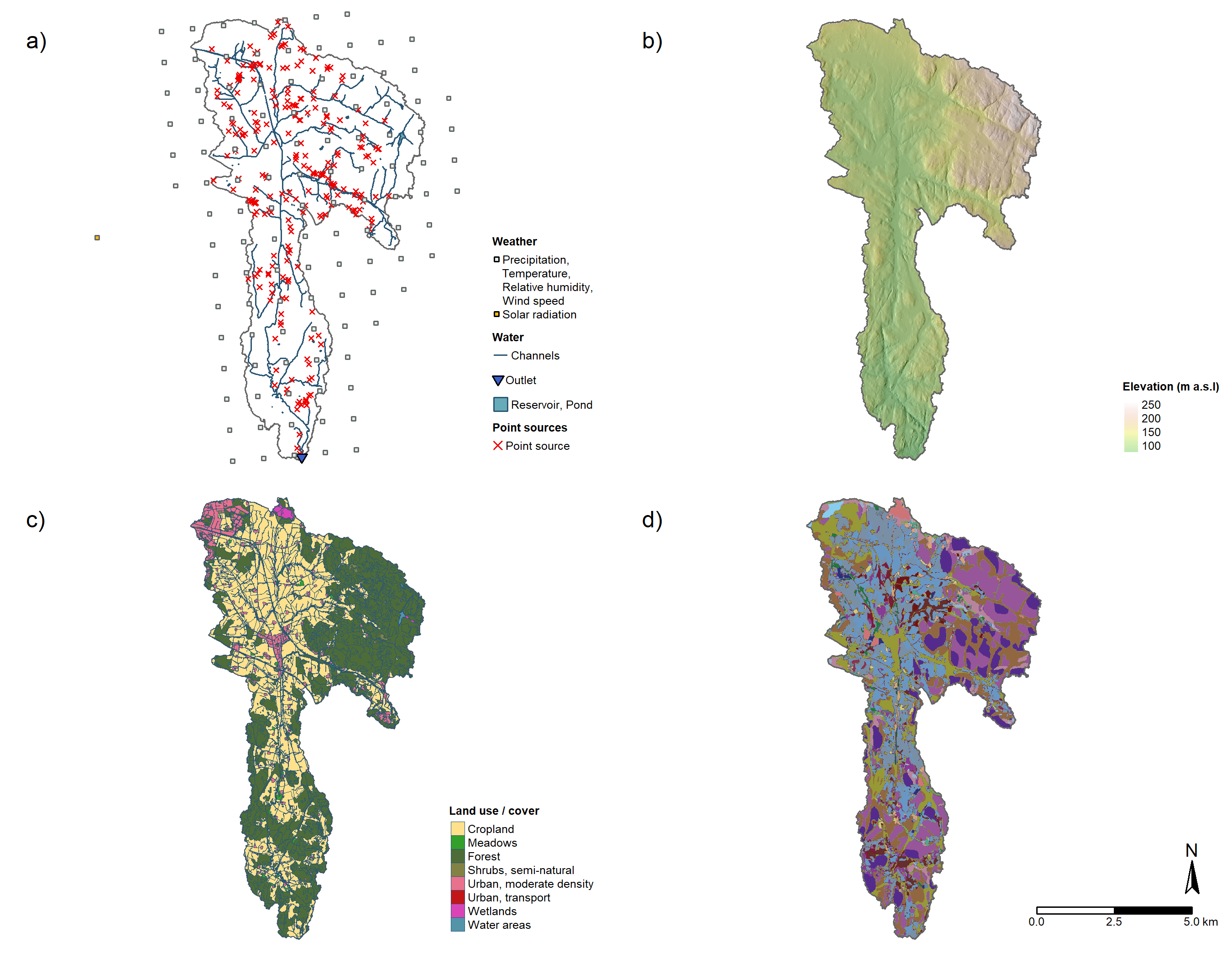
The current state of the weather setup can be seen in panel A :